
This document summarizes the key features of our custom web application design service that will help improve business efficiency in 2026.

In an era where businesses must cope with competition, evolving consumer behavior, and an ever-increasing volume of data, adopting technology in management is no longer just an option for large organizations but has become a crucial part of developing businesses to operate efficiently.
Many organizations still use spreadsheets, multi-system programs, or workflows that require repetitive manual data entry, resulting in delays, scattered data, and difficulty in verification. Developing a web application designed to align with actual workflows is one approach to addressing these problems.
custom web application design service enables businesses to develop systems that meet specific needs, ranging from internal management systems and e-commerce to CRM systems and platforms for customers and partners. We can plan functions, data integration, and system scalability to align with your organization's goals.
This article will introduce key features to consider in 2026 , approaches to developing systems suitable for your business, and the role of WebPac Co., Ltd. in supporting digital system development for organizations.
What is a custom web application , and why should businesses prioritize it ?
A custom web application is a web-based software system developed to support the specific needs, workflows, and user groups of a business. This differs from a typical website that focuses on providing information, or from off-the-shelf software with standard functions for a wide range of users.
Choosing a custom web application design service allows organizations to define functionality based on the problems they need to solve, such as document approval systems, customer tracking systems, stock management systems, or dashboards for monitoring performance.
However, developing a custom system doesn't mean every business needs to build an entirely new system. Considering process complexity, budget, personnel availability, and long-term cost-effectiveness are crucial factors before making an investment decision.
- Responsive Design : Compatible with all devices.
modern web applications should have is responsive design , which allows screens and elements to adapt to use on computers, tablets, and smartphones.
By 2026, users will no longer be limited to working in the office. Sales staff may need to check customer information while traveling, service teams may need to record data on the ground, or managers may need to track performance via mobile devices.
Features to consider include:
- Adjusting the layout to fit the screen size.
- Touch-enabled buttons and forms.
- A data table that can be used on a small screen.
- Designing the navigation to provide easy access to important menus.
A multi-device design enhances user convenience and reduces limitations in system access, especially for organizations with teams working remotely.
For custom web application design services , planning responsive design from the UX/UI stage helps provide a clear direction for system development and reduces the need for subsequent screen rework.
- UX/UI Design that is designed according to user behavior.
A system with numerous functions doesn't always guarantee good performance. If users have to navigate complex steps, find difficult menus, or repetitive data entry, it can negatively impact system efficiency and internal acceptance.
UX/UI Design is therefore a crucial component of custom web application design services , as it helps connect business needs with the actual user experience.
Features and approaches to consider.
Task-Based Design: Design screens to align with tasks users frequently perform, such as creating quotes, approving requests, or tracking job status.
dashboard : Displays key information and task status in a quick-read format, with filtering and sorting capabilities based on user roles.
Form and Validation: Reduce data entry errors with clear instructions, data verification, and easy-to-understand warning messages.
Systematic navigation : Menus are grouped according to workflow, allowing users to easily access the functions they need.
UX/UI design should begin with understanding each user group, whether they are administrators, employees, managers, customers, or partners, because each group has different goals and needs for using the system.
- User management and access rights system.
Businesses with multiple departments or sensitive data need to define who can access, edit, approve, or view each type of data.
User Management and Role-Based Access Control (RBAC) features allow organizations to manage access rights to suit the roles of each individual.
Examples of use in organizations include:
- The system administrator can manage accounts and configure system settings.
- The manager can review and approve the items.
- Employees can only access information relevant to their job.
- Customers can view their information through the Customer Portal.
- Business partners can track authorized items.
Access control design should consider user, department, project, or data type levels as appropriate. Additionally, it should include systems for account management, access suspension, and history monitoring.
For multi-tenant applications (systems supporting multiple organizations or clients ) , careful planning for data separation and access control is necessary to help mitigate the risk of unauthorized data access.
- Workflow Automation reduces repetitive tasks and increases work speed.
Workflow automation is a feature that helps businesses transform manually performed workflows into automated processes based on defined conditions.
In many organizations, tasks such as requesting approval, sending notifications, creating lists, or updating statuses may require coordination through email, chat, or multi-stage documents, making it difficult to track progress.
custom web application design service can incorporate workflow automation to create applications that align with your organization's specific workflows.
Examples of implementing Workflow Automation .
Document approval system
When an employee submits a request, the system can forward it to the authorized approvers in the predetermined order and record the status of the item.
Automatic notification system
Send notifications when there are new items, tasks due soon, or status changes.
Job forwarding and tracking system
Define work handover procedures, responsible parties, and terms of operation to facilitate progress monitoring.
Designing a good workflow should begin with analyzing the actual process, such as points of delay, repetitive data entry, and approval conditions, so that the system can solve problems directly, rather than simply implementing automation without a clear objective.
- API Integration : Connects data between systems.
Many businesses use multiple types of systems, such as CRM, ERP, accounting systems, inventory management systems, payment systems, and customer communication platforms. If these systems cannot exchange data, duplicate data and inconsistent information may occur.
API integration is a feature that allows web applications to communicate with other systems through a designed channel.
Example of system connection.
- Connect your CRM to receive customer information and contact history.
- Connect your ERP system to exchange sales and purchasing data.
- Connect the accounting system to send financial transaction data.
- Connect your payment gateway for online payments.
- Connect to email, SMS , or notification services.
- Connect AI services for searching, analyzing, or processing data based on use cases.
Planning APIs from the ground up allows development teams to systematically define data structures, authentication, error handling, and access control.
custom web application design project, it is essential to check the readiness of the existing system and the limitations of APIs from external providers before starting development. This is to plan connections that are suitable for the scope of work and business requirements.
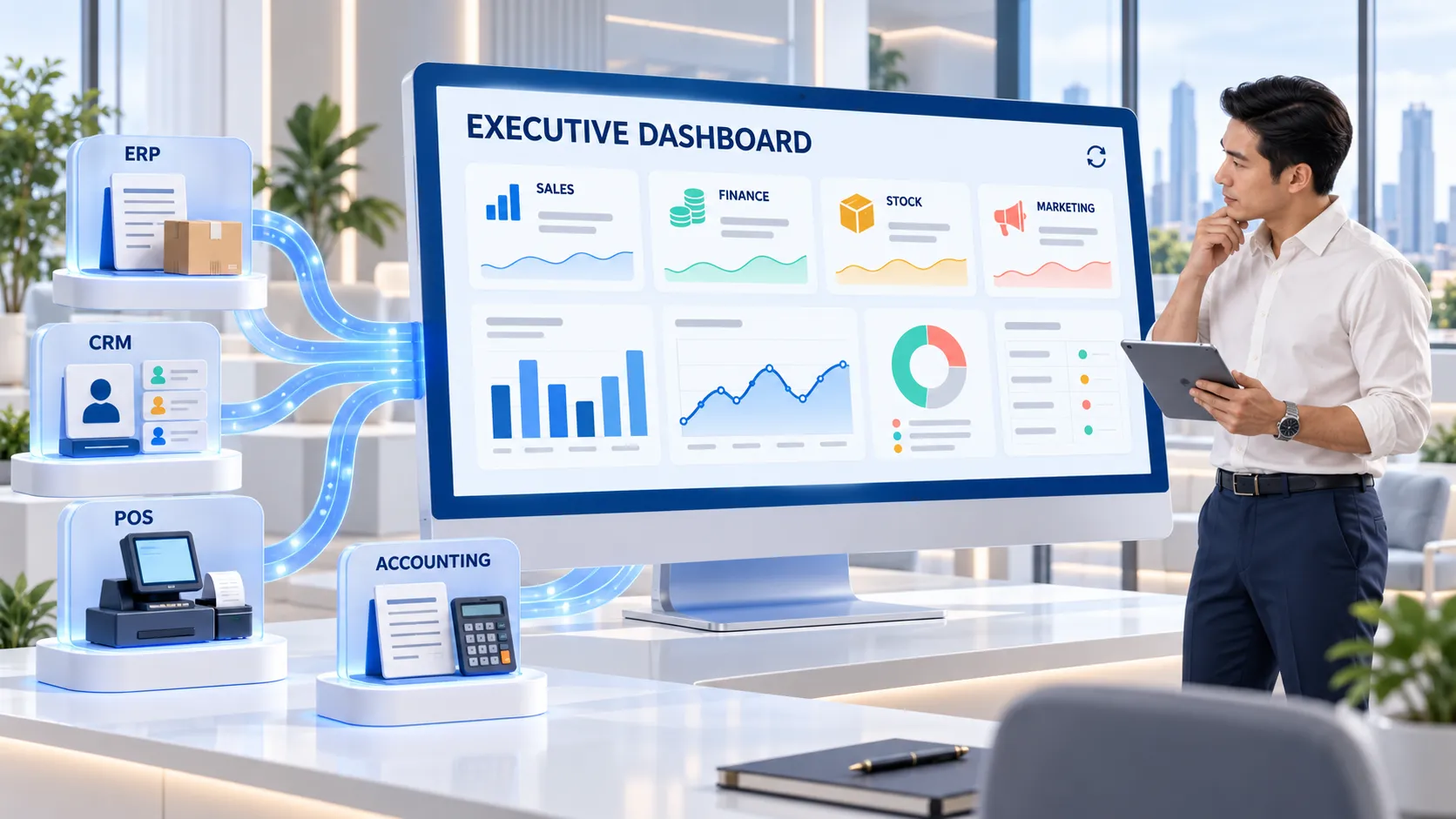
- Dashboards and data analytics systems to support decision-making.
Data from daily operations can be used to analyze organizational performance, but if the data is scattered across multiple files or systems, management can spend a significant amount of time collecting and compiling reports.
Dashboards and reporting systems help display key information in user-friendly formats, such as tables, graphs, metrics, and process status indicators.
Features to consider
Real-Time or Near Real-Time Data: Displays data that is updated at a frequency appropriate to the system and purpose. It does not necessarily have to be real-time in all cases .
KPI Dashboard: Track key performance indicators such as sales, order volume, service duration, or operational performance.
Data Filtering: Filter data by time period, department, branch, or job type to help users find the information they need.
Export and Report Generation: Export data or create reports for meetings, audits, and further analysis.
Designing a dashboard should start with business questions that need answers, such as which tasks take the longest, which customer groups are frequently contacted, or which processes have a backlog of items. Setting clear goals helps make the displayed data more useful for decision-making.
- Data security and protection systems.
When businesses integrate customer data, employee information, sales data, or financial data into a web application, security should be part of the design from the start.
Security features that should be considered include:
- Authentication system for identity verification.
- Defining access rights based on roles.
- Data encryption and communication as appropriate.
- Session management and protection against unauthorized access.
- Audit logs are used to record important activities.
- Data backup and system recovery procedures.
- Testing and verifying security vulnerabilities.
The selection of security measures should consider the type of data, business risks, relevant requirements, and the actual system structure, referencing appropriate guidelines such as OWASP for web application security planning.
For organizations in Thailand, the design of personal data systems should consider legal requirements and obligations related to data processing, and should be evaluated based on the actual use case of each project.
- AI Integration and Intelligent Systems for Business
AI integration is another approach that organizations can consider when developing custom web applications in 2026 , especially systems that need to manage large amounts of data, provide customer service, or support repetitive tasks.
However, the adoption of AI should begin with a clear problem and assess the suitability of the data, accuracy, cost, and privacy risks.
Examples of using AI in web applications.
AI Chatbot: Helps answer repetitive questions and directs users to relevant information or services. It is recommended to have defined response ranges and referral channels for human interaction.
Intelligent Search: Helps find information in the system using natural language keywords. Its efficiency depends on the design of the data and the search system.
Document Processing: Helps to separate or categorize information from documents based on the capabilities of the chosen tool, and the results should be checked for importance.
AI-Assisted Reporting: Supports data summarization or creating perspectives for analysis. However, data accuracy should be verified before decision-making.
Workflow Assistance: Helps to prioritize or suggest workflow steps based on specified conditions. However, high-impact operations should be controlled and monitored by humans.
development of AI does not depend solely on having sophisticated features, but also on its connection to quality data and workflows.
- Performance Optimization and Growth Capability.
As the number of users and data increases, web applications need to be designed to support the workload aligned with business goals.
Performance optimization encompasses code design, databases, API architecture , and the environment in which the system is served.
Points to consider.
- appropriate databases and queries .
- Using caching based on data type.
- Server and computing resource management.
- Checking system speed and errors.
- The testing supports the target number of users.
- Planning for system expansion as the business grows.
The choice of architecture, such as Modular Monolith or Microservices, should be based on the size and complexity of the project, not solely on technological trends.
Designing a system to be scalable for the future helps reduce limitations when there is a need to add modules, connect new services, or support a higher number of users. However, the ability to scale the system must be in line with the budget and resources for maintenance.
- Integration with CRM, ERP , and enterprise management systems.
For businesses that need to connect the workflows of multiple departments, developing a custom web application can be part of the enterprise management system structure, either by integrating with existing systems or developing specific modules that are missing.
Examples of use cases include:
System > Usage Guidelines > CRM > Manage customer data and track sales opportunities > ERP > Link purchasing, product, and internal process data > HRM > Support employee data, leave, and approval processes > Inventory > Track inventory, movement, and stock levels > Customer Portal > Allow customers to access information and track service status.
System integration should include defined sources of truth, data synchronization methods, and error handling guidelines to help reduce data inconsistencies.
custom web application design service , which plans optimal integration with management systems, can help organizations reduce fragmentation and create more interconnected processes.
the right Custom Web Application features for your business.
Feature selection shouldn't be based solely on the system's capabilities, but should begin with user needs, problems encountered, and desired business outcomes.
Step 1: Analyze the problem and work process.
Gather information from actual users, such as employees, managers, IT staff , and executives, to identify time-consuming processes, repetitive data entry, or common errors.
Issues should be prioritized based on their impact and urgency before starting to define features.
Step 2: Define user groups and permissions.
Identify who will use the system, what information each group needs, and their levels of access rights. This forms the basis for designing the UX/UI and security system.
Step 3: Prioritize features periodically.
The development process can be divided into phases, such as:
- Phase 1: Core functions, user systems, and key workflows.
- Phase 2: Integrating the Dashboard and Reporting Systems
- Phase 3: AI features, advanced analytics, and additional modules.
The MVP ( Minimum Viable Product) development approach and phased functional expansion allow organizations to manage project scope and evaluate results before increasing system complexity.
Step 4: Plan for long-term system maintenance.
In addition to development for immediate availability, consideration should be given to maintenance, data backup, security updates, performance monitoring, and support for future needs.
Establishing a system maintenance plan from the outset provides organizations with a clear approach to managing the system after it has been launched.
Custom web application design services from Webpark Co., Ltd.
Webpark Co. , Ltd. provides digital system development and technology solutions for businesses, focusing on leveraging systems to support efficient management and organizational growth .
For organizations looking for custom web application design services , the initial phase of the project should focus on understanding the business problem and user needs before designing a system with a suitable structure and functionality.
Webpark Expertise in systems development and digital technology can be used to guide project planning, with the appropriate scope of services and features determined based on each client's needs.
Development guidelines that should be considered in collaboration with Webpark.
- Requirement Analysis
Understand the goals, workflows, and user requirements to define the project scope.
- UX/UI and System Design
Design the user experience, screen structure, and system workflow to align with real-world processes.
- Development and Integration
Develop functions within the defined scope, considering integration with related systems and services.
- Testing and System Maintenance
Monitor the system's functionality within the project scope and plan its implementation and maintenance.
The selection of a system development partner should consider relevant experience, business understanding, communication skills, warranty scope, and post-delivery support approach.
Frequently Asked Questions ( FAQ)
- What is Custom Web Application Design service ?
Custom web application design services involve planning and developing web applications that align with the specific needs, workflows, and user groups of a business. Functions, connectivity, and system structure can be defined according to the project scope.
- 2. What are some of the key features of custom web applications in 2026?
Features to consider include Responsive Design, UX/UI, User Management, Workflow Automation, API Integration, Dashboard, Security, AI Integration , and Scalability. These should be selected based on the business's needs and goals.
- What types of businesses are suitable for custom web applications?
Businesses with specific workflows, the need to connect data across multiple systems, diverse user groups, or functionalities not supported by off-the-shelf software may consider a custom web application after analyzing the cost-effectiveness and requirements.
- How should I choose the Custom Web Application feature ?
Start by analyzing the problem and workflow, identifying user groups, defining necessary functions, prioritizing development phases, and planning for security, system maintenance, and future expansion.
- How can WebPark Co., Ltd. help develop custom web applications ?
Webpark Co., Ltd. can be a digital system development partner, with the scope of services and functions defined based on the specific needs of each client project. This includes system analysis, design, and development within the agreed-upon scope.
Summarize
Custom web application design services help organizations develop systems that align with their specific business processes. Key features to consider include responsive design, UX/UI, access control , workflow automation, API integration, dashboards, security, AI integration, and scalability.
Developing an effective system doesn't depend on acquiring a large number of features, but rather on selecting capabilities that address the organization's real problems and can be implemented appropriately.
By 2026, businesses should focus on designing systems that are flexible, data-connected, secure, and scalable for future goals. Collaborating with a system development company like Webpark Co. , Ltd. could be part of the process of planning and developing digital solutions tailored to the organization's needs.
If your business is looking for a web application designed for specific workflows, starting with a needs analysis and clearly defining the project scope will lay the foundation for developing a system that meets user needs and supports long-term growth.
Contact us
Webpark Co. , Ltd.
525/89 Soi Ladprao 126 ( Karnporn ), Phlapphal , Wangthonglang , Bangkok 10310
Email: oraphan@webpark.co.th
Tel: 095 539 2666
Let us be your technology partner to help drive your business towards efficient management and support stable and sustainable growth in the digital age.